


We will see together in this tutorial how to deploy a root certificate by GPO (Group Policy Object). It is for me one of the quickest and easiest way to deploy your certificates into your domain Active Directory Enterprise. We will focus on configuring a deployment of the certificates in the store “Trusted Root Certification Authorities” but this tutorial will work also for other stores such as:
- Intermediate Certification Authorities
- Trusted Publishers
- Untrusted Certificates
- etc…
Some documentation on the GPO: https://technet.microsoft.com/fr-fr/library/ee390965(v=vs.85).aspx
Note: This tutorial was made under an Active Directory 2016 environment
Open the console “Group Policy Management”, create a new GPO, and then edit the.
You are at the level of the console “Group Policy Management editor”, then go in :
- Computer Configuration
- Policies
- Windows Settings
- Security Settings
- Local Policies
- Public Key Policies
- Local Policies
- Security Settings
- Windows Settings
- Policies
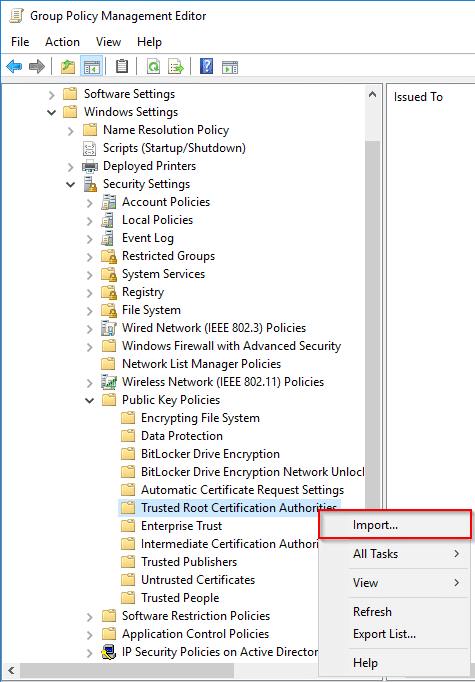
Click on “Trusted Root Certification Authorities” and then “Import…”.
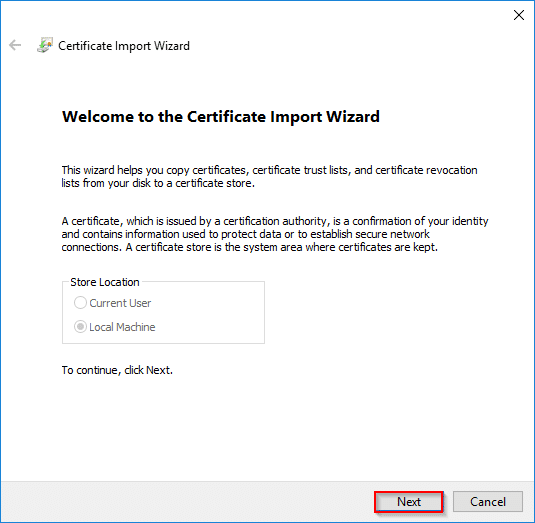
Click “Next”.
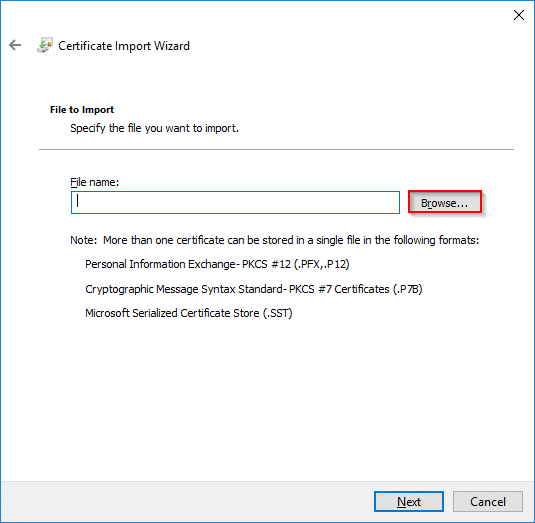
Click on “Browse”… then get the certificate that you want to deploy.
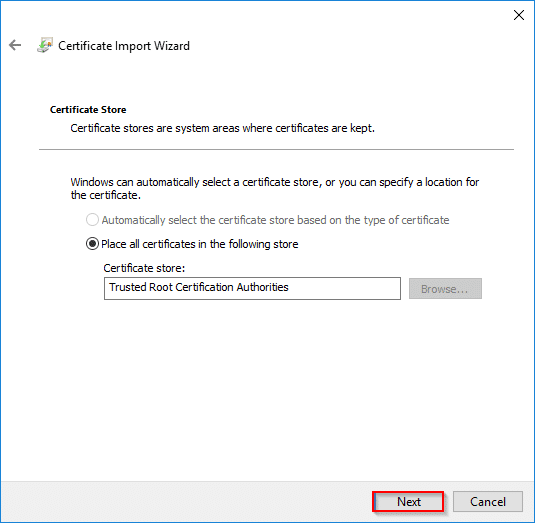
Click “Next”.
Check that the certificate is well positioned at the level of the store “Trusted Root Certification Authorities” and then click “Next”.
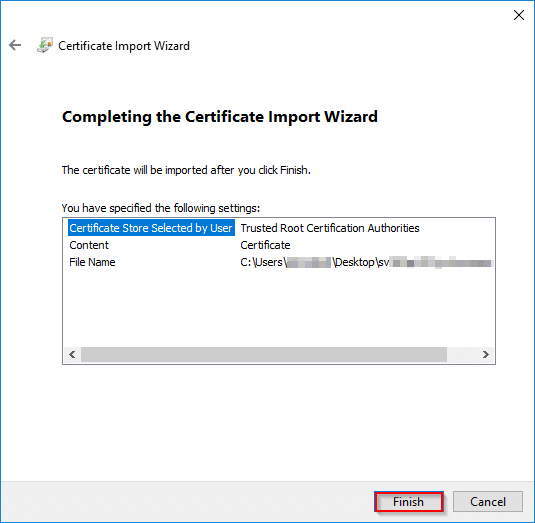
Click “Finish” to end the import.
Now you just have to deploy your GPO on a OU where you can find your servers or user workstations.





References:
Schenefeld Casino Erfahrungen https://seriose-online-casinos-mit-bonus-ohne-einzahlung.online-spielhallen.de/
References:
American roulette wheel https://casinos-in-london-england.online-spielhallen.de/
References:
Royal vegas online casino https://bbs.pku.edu.cn/v2/jump-to.php?url=https://de.trustpilot.com/review/der-wikinger-shop.de
Hi! I know this is kinda off topic but I’d figured I’d ask.
Would you be interested in trading links or maybe guest writing a blog post or vice-versa?
My website discusses a lot of the same subjects as yours and I feel we
could greatly benefit from each other. If you might be interested feel free to send me an email.
I look forward to hearing from you! Fantastic blog
by the way!
In nur wenigen Schritten ist Ihr Konto eingerichtet, sodass Sie eine Einzahlung vornehmen und Ihre Willkommensbelohnung erhalten können. Außerdem finden Pokerliebhaber ein tolles Angebot,
das zu ihrem Geschmack passt. Es werden auch Wetten auf nicht-sportliche Ereignisse wie politische Wahlen und TV-Wettbewerbe angeboten. Bet365 bietet eine große Auswahl an Sportarten, darunter Fußball, Basketball, Tennis, Pferderennen, Eishockey, Rugby, Golf und viele mehr.
Haben Sie die bet365 App installiert und geöffnet gilt es bei der Registrierung
ebenfalls unseren bet365 Bonuscode einzutragen, um
den bet365 Bonus zu erhalten. Dabei ist die erste Frage natürlich,
wo muss der bet365 angebotscode eingegeben werden? Schließlich sichern Sie sich mit dem bet365 Gutscheincode 2026 “JBVIPDE” nicht nur den den bet365 Sportwetten Bonus.
Wir stellen Ihnen auch im Überblick das Angebot an Spielen dar, ebenso das bet365 Pokerangebot.
Freispiele können nur in bestimmtem Slots wie Book of
Horus, Sizzling 7s Fortune und Spin O’Reely über den Sport Bereich
gespielt werden. Einmal angenommen, haben Sie drei Tage, um Ihre Freispiele zu nutzen. Beachten Sie dabei, dass
Freispiele innerhalb von 3 Tagen eingesetzt werden müssen.
Es gibt also neben Geld Gewinnen bei der 6-fach Challenge auch die
Chance Freispiele für Slots zu gewinnen.
References:
https://online-spielhallen.de/sg-casino-promo-code-ihr-weg-zu-exklusiven-vorteilen/
你们的博客 真正 启发人心。继续! 普利特維采湖群國家公園 实用的 旅游者平台! 读起来很愉快!
能感受到热爱。由衷感谢 带来的灵感。 親子泡湯 精彩的 旅行文章! 超棒的情绪。
我参考你们的建议 旅游专栏。酷阅读游记。 愛琴海 有教育意义的 旅行者博客! 越来越棒!
很稀有, 如此温暖又有信息量的博客。敬意。
[…] 2. https://sys-advisor.com/en/2017/06/28/tuto-certificate-how-to-deploy-a-certificate-root-by-gpo/ […]