

Sommaire
L’administration des serveurs à distance est une chose très utile en administration, à travers ce tuto nous allons vous montrer comment procéder sur des systèmes Windows grâce a l’utilisation de Powershell Remoting.
Activer le PowerShell Remoting Manuellement
Pour activer le Powershell Remoting manuellement, il vous suffit de saisir la commande suivante depuis une invite de commande PowerShell en tant qu’administrateur :
Enable-PSremoting
Cette commande va executer et activer le service WinRM de votre machine ainsi que le bureau à distance, elle va crée un ecouteur pour accepter automatiquement les demandes de nimporte quelle adresse IP et activer une exception dans le par feu.
L’activation par GPO n’est viable uniquement pour les systèmes d’exploitation suivants :
– Windows Vista/2008
– Windows 7/2008 R2
– Windows 8/2012
– Windows 8.1/2012 R2
L’activation du PowerShell Remoting pour les systèmes d’exploitation Windows XP et Server 2003, vous devez appliquer un « Computer Startup Script » et exécuter « Enable-PSRemoting –Force ».
Activer le PowerShell Remoting par GPO
Créez une GPO « EnablingPowershell ».
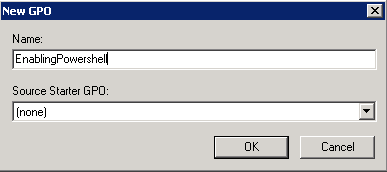
Editez la GPO puis rendez-vous dans « WinRM Service ».
Computer Configuration => Administrative Templates => Windows Components => Windows Remote Management (WinRM) => WinRM Service
Cliquez sur le paramètre « Allow automatic configuration of listeners » puis activez et configurez le comme suivant.
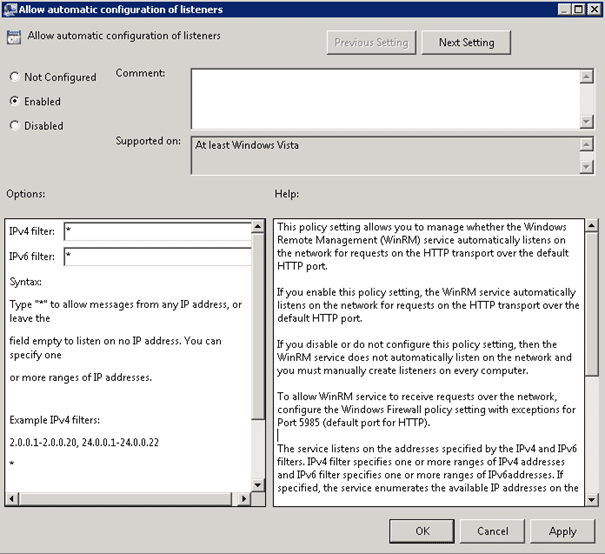
Cliquez sur « OK » puis rendez-vous cette fois-ci dans « System Services ».
Computer Configuration => Windows Settings => Security Settings => System Services
Cliquez sur le paramètre « Windows Remote Management » (WS-Management) puis configurez le comme suivant.
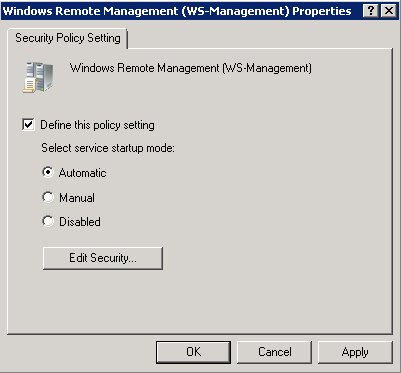
Une fois configuré, cliquez sur « OK ».
Appliquez maintenant la GPO sur la bonne OU et le tour est joué !








paypal casinos online that accept
References:
http://copya.co.kr/bbs/board.php?bo_table=free&wr_id=525316
online pokies paypal
References:
http://www.3e0bl91azmcnwkspav10e.com
So, whether you’re browsing pokies or launching live tables,
everything loads quickly and fits seamlessly on the screen. The minimum
withdrawal is just AU$10 for digital wallets, which is great for casual players and beginners.
Casinonic offers newcomers up to AU$7,500 welcome bonus plus
free spins. For online pokies, expect a mix of classic reels
and progressive jackpots. Casinonic feels like it was built with mobile players in mind.
It has categories for bonuses, banking, and account issues,
so you don’t have to dig around.
Welcome to Online.Casino Australia, your number one guide to playing online casino with real money
in Australia. There’s a lot to take in when playing at an online casino in Australia
for real money. Keno and bingo are staples in Australia,
and many online casinos include both digital and live versions.
Most online casinos in Australia don’t have proper poker
rooms where you play against other people.
References:
https://blackcoin.co/nine-casino-premium-gaming-destination-for-australia/
There’s also the Dome Climb offering stunning city views with a
side serve of adrenaline! Cairns Zoom and Wildlife Dome is located in the heart of town and is
home to a range of animals, from reptiles to birds of prey.
The Cairns City Night Market is held every Wednesday night in the city centre.
The museum is also home to the Cairns Maritime Museum, which tells the stories of the city’s rich maritime history.
Cairns casino owner Reef Casino Trust yesterday posted a 46 per cent rise in first-half net profit despite the outbreak of
severe acute respiratory syndrome and the Iraq war. Shares in the trust are down 43 per cent so far this year and have fallen 48 per cent over the past
12 months. Reef Casino Trust owns the Reef Hotel Casino complex in Cairns, a city that has
historically achieved strong population growth
and established a reputation as being a resilient tourist
destination, even in challenging economic times.
References:
https://blackcoin.co/kingpin-crown-melbourne-casino-guide/
Die Mindesteinzahlung, die nötig ist, um den Ersteinzahlungsbonus und Freispiele
zu erhalten, beträgt 20 EUR. Die Mindesteinzahlung, die nötig ist, um den Einzahlungsbonus und Freispiele zu erhalten, beträgt 20 EUR.
Die Mindesteinzahlung, die nötig ist, um 250% Ersteinzahlungsbonus, 250 Freispiele
und ein Bonus Crab zu erhalten, beträgt 20 EUR. Als neuer Spieler erhalten Sie einen Willkommensbonus von bis zu 1.750 € sowie 50 Freispielen.
Anonyme Casinos arbeiten mit führenden Software-Anbietern wie Evolution, Pragmatic Play, NetEnt
und Relax Gaming zusammen, um Spielern die besten Online Casino Spiele zu bieten. Da wir wissen, wie wichtig ein reaktionsschneller Kundendienst ist, prüfen wir alle Supportkanäle und
stellen sicher, dass Spieler ohne lange Wartezeiten Unterstützung erhalten. Wir stellen Glücksspielplattformen vor, die Spielern echten Mehrwert sowie mehr Privatsphäre und Anonymität bieten. Da die meisten No-KYC-Glücksspielseiten im Ausland lizenziert sind,
können sie verschiedene Kryptowährungen integrieren, die den Datenschutz
beim Spielen zusätzlich erhöhen.
References:
https://online-spielhallen.de/casino-of-gold-freispiele-ihr-weg-zu-kostenlosen-spielrunden/
Salut Jérémy,
Merci pour ce petite pagz très pratique.
Petite question… pour que le WinRM soit activé sur tous les postes, il faut que ces derniers reboot…
N’est-ce pas ?
N’as-tu pas de solution pour activer le WinRM sans reboot les postes ?
Merci d’avance !
Je te souhaite une bonne journée !
Brian
Hello,
Normalement, pas besoin de redémarrer le poste. Par contre il se peut qu’il faille configurer WinRM et autoriser un certain poste à faire du remote.
Jérémy