


Sommaire
Le connecteur Azure Active Directory Connect est un outil permettant de faire l’interface entre votre/vos domaines Active Directory OnPremise et Azure Active Directory et ainsi de synchroniser des informations dans Azure.
Il existe en effet plusieurs méthodes pour remonter vos utilisateurs On Premise dans votre Azure Active Directory. Nous verrons ensemble dans ce tuto la méthode la plus simple et la plus rapide à mettre en place qui est Azure Active Directory Connect en mode Password Sync.
Prérequisites
- Un environnement Active Directory OnPremise sain et maîtrisé.
- Un abonnement Azure associé à un Azure Active Directory.
- Un compte administrateur de votre domaine Azure Active Directory.
- Optionnel : Un serveur dédié pour le connecteur Azure Active Directory Connect.
Pour télécharger les sources de AADC, suivez ce lien.
Installation et configuration connecteur Azure Active Directory Connect
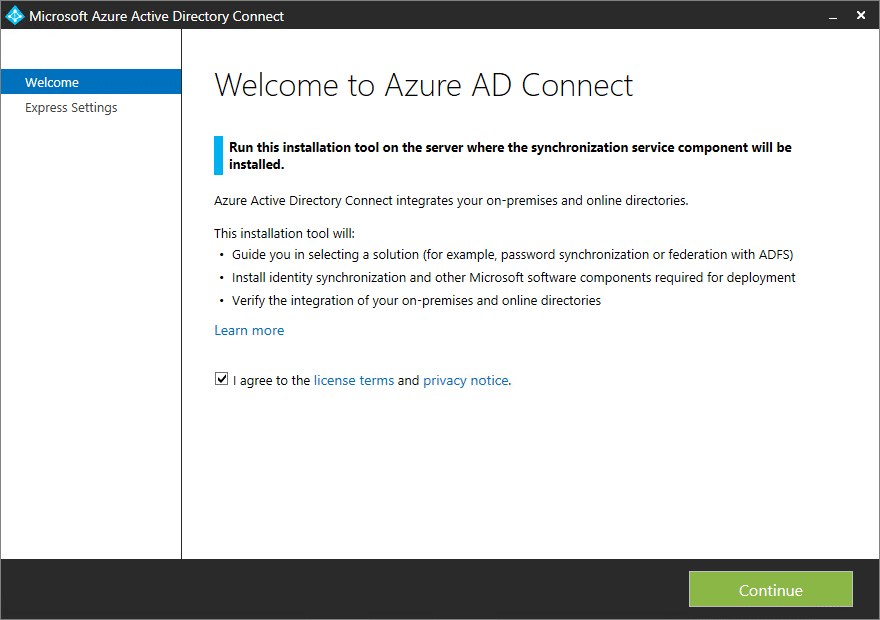
Exécutez les sources AADC sur le serveur ou vous souhaitez déployer le connecteur.
Cochez la case « I agree to the license…. » puis cliquez sur « Continue ».
Cliquez sur « Customize ».
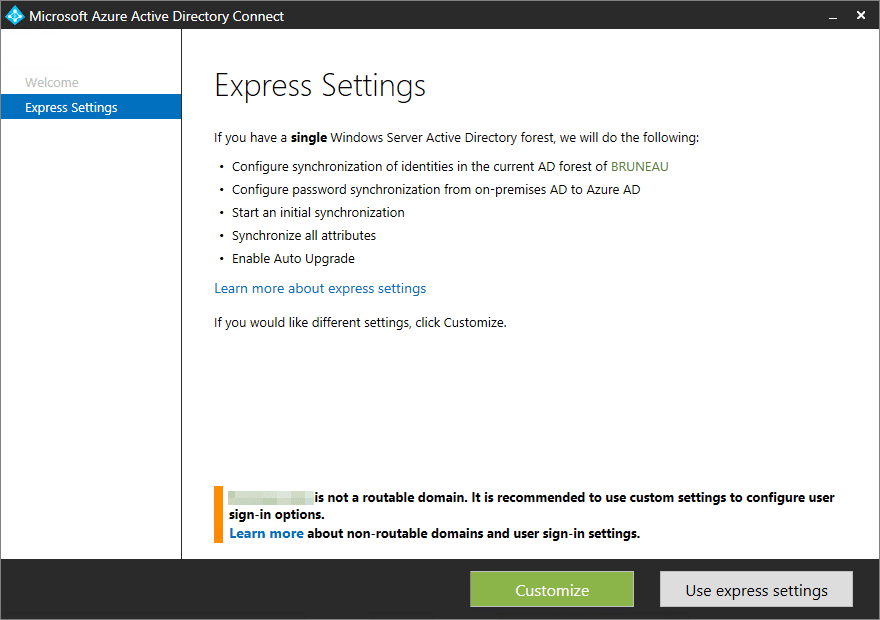
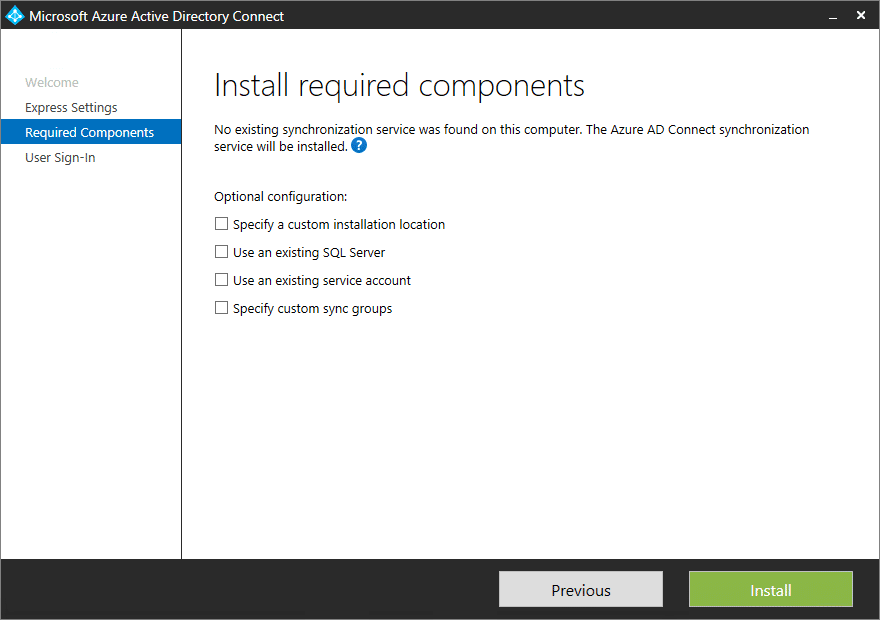
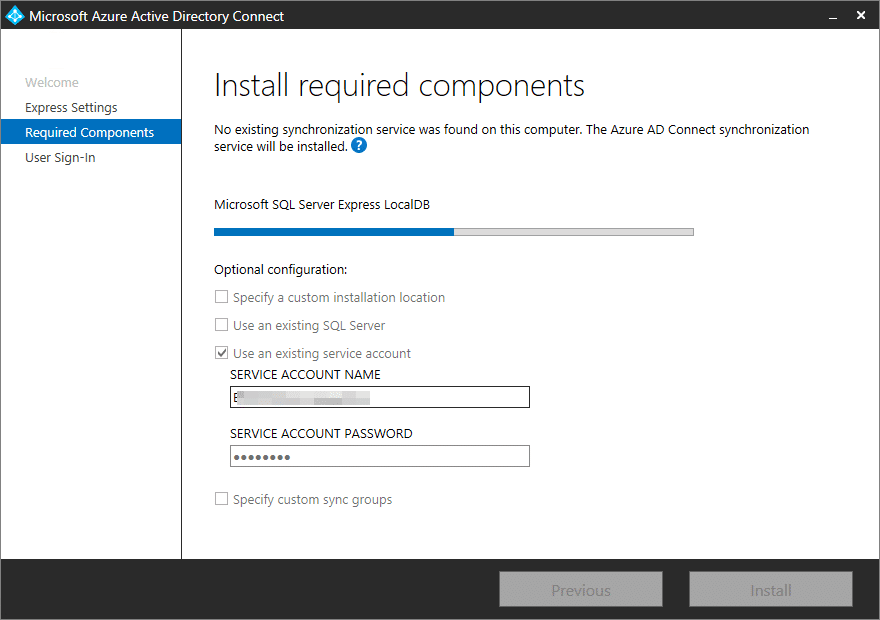
Plusieurs options d’installation / configuration sont disponibles:
- Specify a custom installation location : Modifier le répertoire d’installation par défaut du connecteur.
- Use an existing SQL Server : Si vous ne souhaitez pas utiliser le SQL Express et ainsi utiliser un serveur SQL déjà installé.
- Use an existing service account : Si vous souhaitez utiliser un compte de service dédié au connecteur.
- Specify custom sync groups : Si vous souhaitez spécifier un groupe dédié pour la synchronisation de vos objets dans Azure.
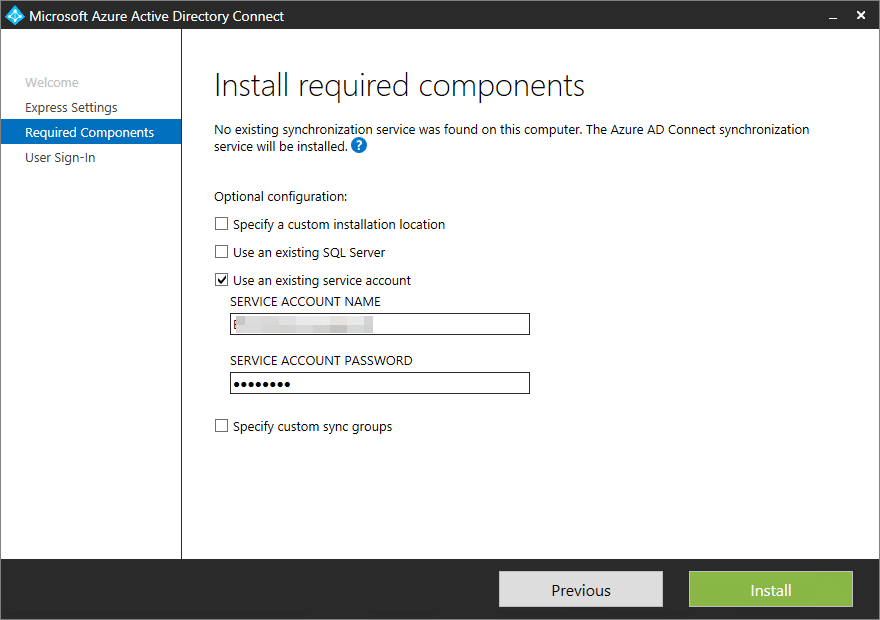
Dans mon cas, je souhaite uniquement utiliser un compte de service dédié à l’utilisation de mon connecteur.
Il suffit donc de cocher la case « Use an existing service account » et de renseignez le compte de service ainsi que son password. Cliquez ensuite sur « Install ».
Installation en cours.
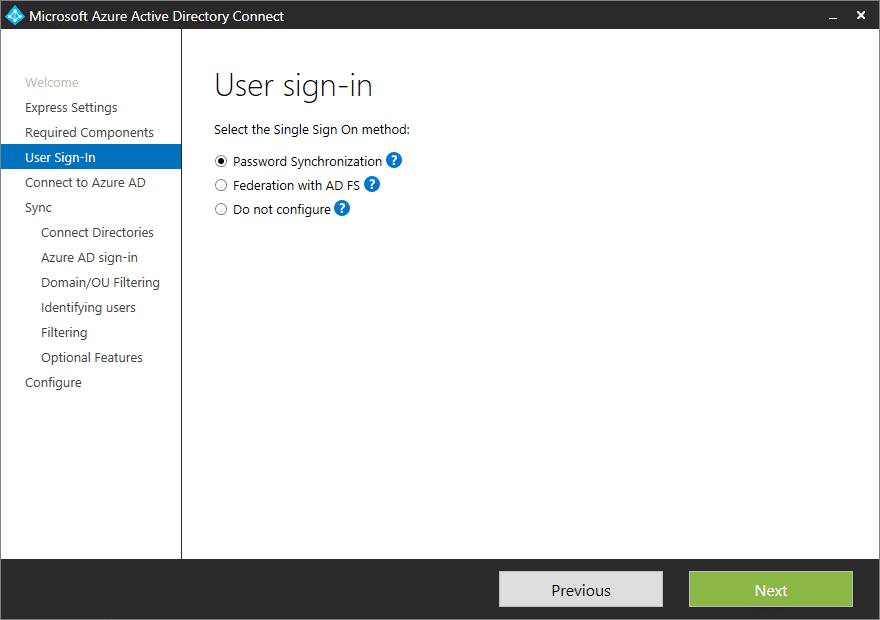
Nous arrivons sur la partie de configuration qui déterminera votre méthode d’authentification :
- Password Synchronization : Le password de votre utilisateur OnPremise et dans Azure est synchronisé et identique, celui-ci s’authentifie directement via Azure.
- Federation with AD FS : Vous utilisez la méthode d’authentification ADFS / Proxy ADFS via votre infrastructure OnPremise.
- Do not configure : Aucune configuration 🙂
Nous choisissons la méthode Password Synchronization dans ce cas, puis cliquez sur « Next ».
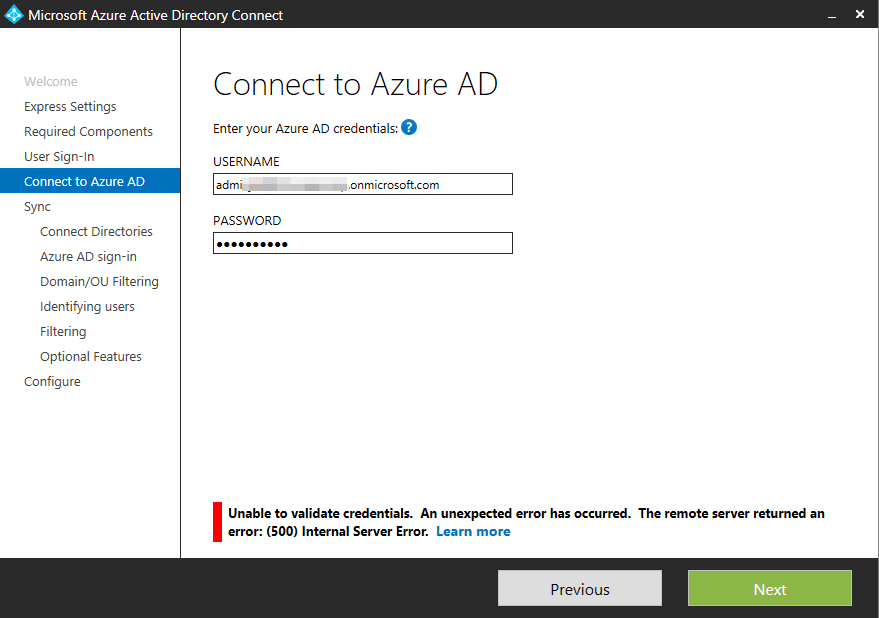
Utilisez ici-même, votre compte local « onmicrosoft.com » qui est administrateur de votre Azure Active Directory. Cliquez sur « Next » pour continuer.
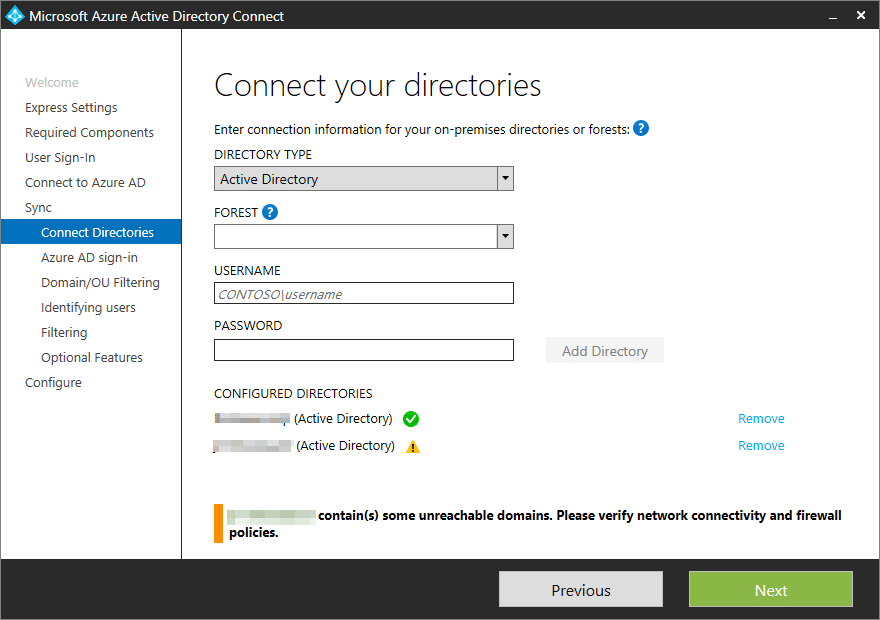
Vous pouvez déclarer les forêts Active Directory OnPremise au niveau desquelles vous souhaitez synchroniser des objets dans Azure.
Pour ajouter une forêt :
- Directory Type : Active Directory
- Forest : VotreForêt
- UserName : Un compte admin de cette forêt
- Password : Le mot de passe du compte admin
Une fois ces informations correctement renseignées, cliquez sur « Add Directory ». Vous pouvez répéter l’opération autant de fois que nécessaire et une fois terminée cliquez sur « Next ».
Afin de pouvoir vous authentifier sur Azure avec votre nom de domaine OnPremise, vous devez obligatoirement passer par l’étape de vérification de ce domaine et ceci directement depuis le portail Azure Active Directory (Un peu d’aide par ici).
Vous pouvez néamoins continuer la configuration du AADC sans avoir vérifié aucun domaine. Cliquez sur « Continue without any verified domains » pour continuer si aucune forêt n’est encore vérifiée.

Choisissez les éléments que vous souhaitez synchroniser puis cliquez sur « Next ».
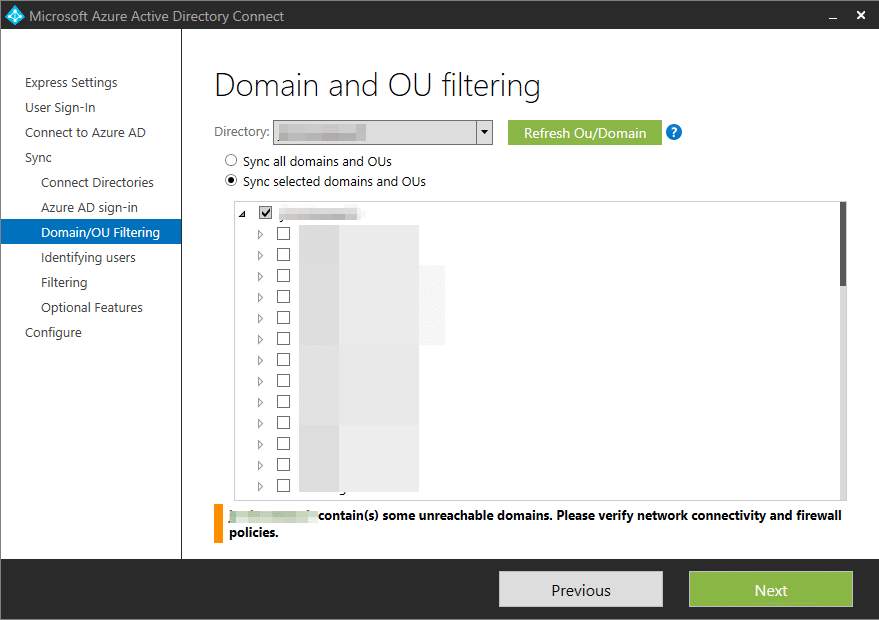
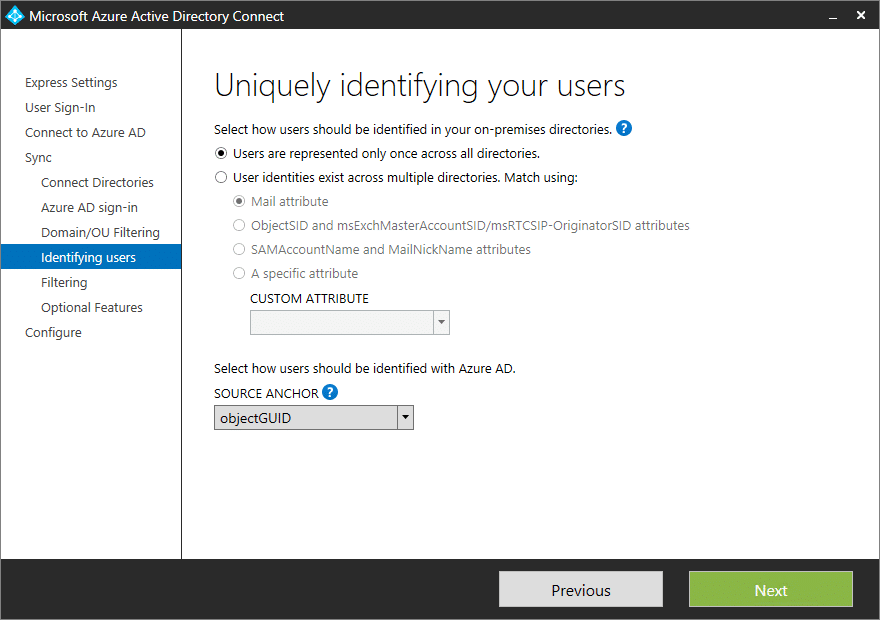
Dans mon cas, je laisse ces paramètres par défaut ainsi mes utilisateurs synchronisés devront être unique et cela tout domaine confondu.
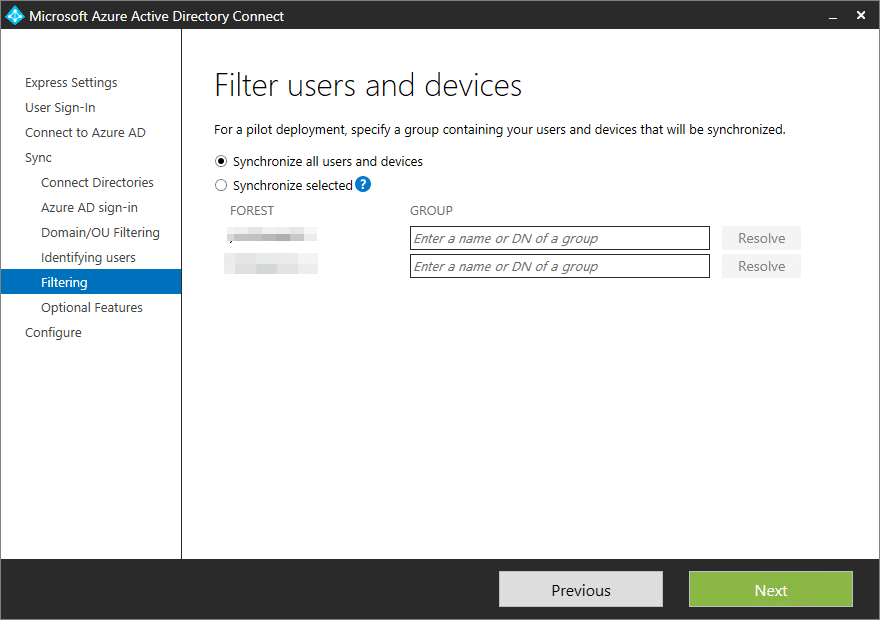
Je décide de synchroniser tous les objets utilisateur et périphérique. Mais vous pouvez également choisir la deuxième option afin de vous appuyer sur un groupe pour la synchronisation. Les objets se trouvant hors du groupe sélectionné ne seront alors jamais synchronisé dans Azure.
Laissez par défaut puis cliquez sur « Next ».

Cliquez sur « Install ».
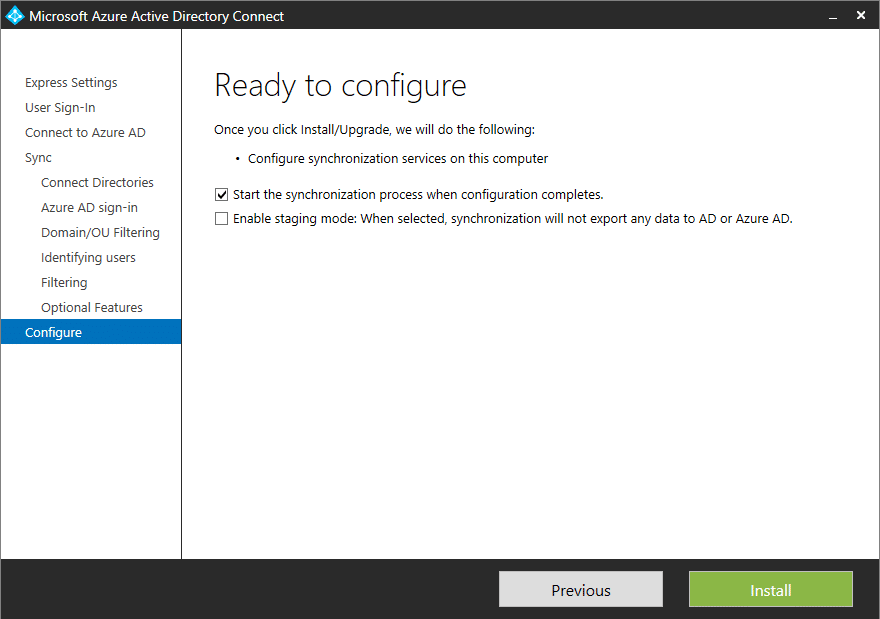
La configuration est maintenant terminée.

Quelques outils utiles sont disponibles depuis le serveur ou vous avez déployé AADC :
- Cmdlets Powershell pour l’administration.
- L’outil « Synchronization Rules » Editor permet d’affiner vos règles / filtres de synchronisation.
- L’outil « Synchronization Service » permet d’avoir l’état de toutes vos synchronisations OnPremise / AAD en temps réel mais également de pouvoir exécuter manuellement ces synchronisations.












The SEO’s secret weapon for link pruning. Find out which of your backlinks are actually alive. Export your link list, run the scan, and watch as it separates the good (200 OK) from the bad (404, 500) and the ugly (timeouts). Try it risk-free.
Download
Download2
casino online paypal
References:
https://jobflux.eu/employer/316860/paypal-casinos-2025-best-online-casinos-that-accept-paypal
Guests can enjoy rooftop bars, spas, and personalized services, ensuring a memorable and rejuvenating stay.
From luxurious waterfront resorts to budget-friendly hostels and family-friendly apartments, the
city provides a comfortable base for exploring the surrounding
wonders. Modern buildings grace the cityscape with a mixture of architectural designs
including the Reef Hotel Casino, Cairns International Hotel and the Cairns Convention Centre.
Almost a century of architecture is reflected in the city streets
– a comfortable blend of traditional Queenslander style and modern designs.
The city itself is where much of the accommodation is situated close to international standard, restaurants, boutique shopping, modern art
galleries and evening entertainment.
The BAR36 offers spectacular entertainment, and the Complex has large meeting and banquet
facilities. The Flinders Bar & Grill is also a
fine restaurant to enjoy a meal after a long day of gaming.
Allow yourself to be pampered at the greatest casinos and exquisite dining establishments.
The Reef Casino Trust, which owns the casino and hotel and derives
rental incomes from both businesses, says it will distribute 100% of the $7.1 million estimated profit to
unitholders. Accor also runs the Pullman-branded hotel on the casino site.
Make the most of your tropical escape with these unforgettable experiences.
Iris Capital, the owner of casinos in Canberra and Alice Springs as
well as more than 60 pubs and hotels, entered into a takeover bid agreement to acquire all shares at $3.5541 each,
which is a 17.69 per cent premium to the closing unit price of $3.02 on July
11. The Cairns Central YHA is located in the city centre and offers a range of accommodation options from
dormitory rooms to private rooms. The hotel is also located close
to many of the city’s attractions. The Hilton Cairns (pictured below) is a modern hotel
located on the waterfront in the city centre. The Heritage Market is located on the outskirts
of Kuranda and offers a range of handcrafted goods, including woodwork, pottery and jewellery.
References:
https://blackcoin.co/roulette-tutorial/
Spieler können auch lernen, wie man Boni und Freispiele optimal nutzt – Aspekte, die in Echtgeldspielen entscheidend sein können.
Zunächst einmal gibt es keine finanziellen Verpflichtungen; Spieler können so viele kostenlose Demospiele im
Casino ausprobieren, wie sie möchten, ohne Angst vor Verlusten haben zu müssen. Online Casino
Demos bieten Spielern eine risikofreie Möglichkeit, verschiedene Casinospiele kostenlos auszuprobieren und sich mit den Spielmechaniken vertraut zu machen. Sie spielen Online Slots
kostenlos direkt auf dieser Seite. Hinzu kommt, dass Sie
kostenlos spielen und somit absolut risikofrei. Wenn Sie im Online Casino
mit Echtgeld spielen, dann setzen Sie sich bitte individuelle Grenzen für Einzahlungen, Verluste, Einsätze und Spieldauer.
Auch wenn das Glücksspiel in Ihrer Gerichtsbarkeit verboten ist, müssen Sie keine rechtlichen Probleme befürchten, wenn Sie unsere
Seite nutzen. Dieser Entwickler arbeitet unter
der Malta-Glücksspiellizenz und hat über 60 Online-Spielautomaten veröffentlicht.
Ist ein Glücksspielhersteller aus Bulgarien, der im Jahr 2002 registriert wurde.
References:
https://online-spielhallen.de/1go-casino-aktionscodes-ihr-schlussel-zu-exklusiven-vorteilen/
[…] – Configuration de azure active directory connect en password sync […]